

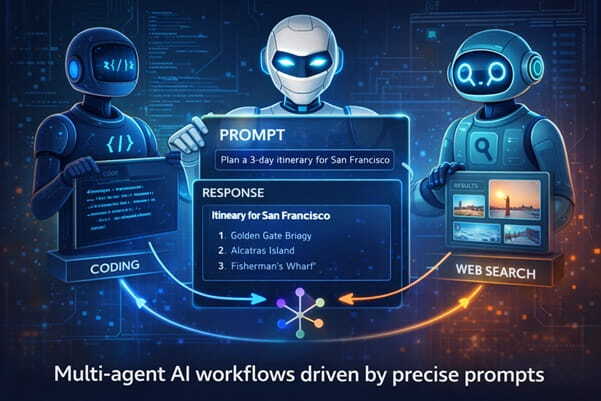
Featured Image Caption: Multi-agent AI Workflows driven by Precise Prompts
Jump to read...
Something changed recently.
Single prompts aren’t enough anymore. One instruction, one output, done. That model is fading. What’s replacing it is more layered, more dynamic, and honestly, a bit more demanding.
Welcome to multi-agent prompt engineering.
Here’s the idea. Instead of asking one AI to do everything, you orchestrate several specialized agents, each with its own role, memory, and instructions. You’re not just writing prompts anymore. You’re designing conversations between machines.
And that shift matters.
What Is Multi-Agent Prompt Engineering?
At its core, multi-agent prompt engineering is about structuring tasks across multiple AI agents that collaborate toward a shared goal.
Simple? On paper, yes.
In practice, it’s closer to directing a team where each member only understands exactly what you say and nothing more. If your instructions are vague, things fall apart quickly. If they’re precise, the system feels almost human.
Think of it like this.
- One agent researches
- Another writes
- A third critiques
- A fourth refines
You’re not prompting. You’re coordinating.
And that’s a different skill entirely.
Why Single-Prompt Systems Are Hitting Limits
Let’s be honest. You’ve probably noticed this.
You give a long, detailed prompt expecting a perfect output, and what comes back feels… slightly off. Not wrong, just unfocused. That happens because a single model tries to juggle too many roles at once.
It’s like asking one person to brainstorm, write, edit, fact-check, and optimize. Something always slips.
Multi-agent systems fix this by breaking complexity into smaller, manageable roles. Each agent stays in its lane. The result feels sharper, more intentional, and far more reliable.
Short sentence here.
That’s the shift.
Core Components of a Multi-Agent Prompt System
Role Definition
Every agent needs a clearly defined identity. Not just what they do, but how they think.
For example:
- Research Agent focuses on accuracy and depth
- Writer Agent focuses on clarity and tone
- Editor Agent focuses on structure and flow
If roles overlap, confusion creeps in. You’ll see duplicated effort or conflicting outputs.
Instruction Boundaries
Agents shouldn’t guess.
You need to define what they can and cannot do. This includes tone, scope, and constraints. When boundaries are tight, outputs improve dramatically.
Loose instructions create noise.
Memory Handling
Here’s where things get interesting.
Some agents need access to previous outputs. Others shouldn’t. If every agent sees everything, the system becomes cluttered. If none do, context gets lost.
Balance matters.
Output Formatting
Each agent should produce structured output that the next agent can easily interpret.
That might mean:
- Bullet summaries
- Tagged sections
- Clean paragraphs
Messy outputs break workflows.
A Real Workflow Example
Let’s walk through something practical.
Imagine you’re building a content pipeline.
Step 1: Research Agent
You prompt the agent to gather insights on a topic. You instruct it to focus on depth, avoid repetition, and present findings in structured notes.
It responds with categorized insights.
Step 2: Writer Agent
This agent receives the research output. Its job is to convert notes into a readable article with a natural tone.
You guide it on voice, pacing, and audience.
Step 3: Critic Agent
Now things get sharp.
The critic reviews the article, identifies weak arguments, unclear sections, and gaps in logic. It doesn’t rewrite. It evaluates.
Step 4: Editor Agent
Finally, the editor refines the content. It improves flow, tightens sentences, and aligns everything with the intended style.
Four agents. One outcome.
Cleaner, stronger, and far more consistent than a single prompt attempt.
Prompt Design Patterns That Actually Work
Let’s get specific.
The “Strict Role Lock” Pattern
You explicitly restrict an agent to one function. No drifting allowed.
Example instruction:
“You are a research agent. Do not write full paragraphs. Only provide structured insights.”
It sounds rigid. That’s the point.
The “Critic Loop” Pattern
You introduce a feedback loop where one agent reviews another’s work before final output.
This adds friction. Good friction.
It’s where quality improves.
The “Progressive Refinement” Pattern
Instead of asking for a perfect result upfront, you build it step by step.
- Draft
- Review
- Improve
- Finalize
Each stage has its own agent or prompt.
The “Context Injection” Pattern
You selectively pass information between agents.
Not everything. Only what’s needed.
This keeps outputs focused and prevents overload.
Common Mistakes That Break Multi-Agent Systems
Let’s call them out.
Overloading Agents
If one agent has too many responsibilities, you’re back to square one. Keep roles tight.
Vague Instructions
Agents don’t interpret intent well. If you’re unclear, results will drift.
Ignoring Output Structure
Unstructured outputs create chaos downstream. Always define format expectations.
Skipping Validation
Without a critic or validation step, errors slip through. You’ll miss them until it’s too late.
How This Impacts Real Work
This isn’t theoretical.
Teams are already using multi-agent systems for:
- Content production
- Code generation
- Customer support workflows
- Research synthesis
And the difference shows.
Work becomes modular. You can tweak one agent without breaking the entire system. That flexibility is powerful.
Here’s a thought.
What happens when every knowledge workflow gets broken into agent-driven steps? You don’t just work faster. You work differently.
How to Start Without Overcomplicating It
Don’t build a massive system on day one.
Start small.
Pick a task you repeat often. Break it into two roles. Maybe three. Write clear prompts for each role and test how they interact.
You’ll notice gaps quickly.
Fix those. Iterate. Expand.
That’s how real systems evolve.
Advanced Insight: Designing for Failure
Here’s something most people ignore.
Your system will fail.
Agents will misunderstand instructions. Outputs will conflict. Context will get messy. That’s normal.
So design for it.
Add checkpoints. Include validation steps. Create fallback prompts. When things break, your system should recover without starting from scratch.
That’s where expertise shows.
Final Thought
This isn’t just a new technique.
It’s a shift in how we think about working with AI. You’re no longer asking for answers. You’re building systems that produce them.
And that changes everything.
FAQ Section
What makes multi-agent prompt engineering different from regular prompting?
Regular prompting focuses on a single interaction, while multi-agent systems distribute tasks across multiple specialized agents. This creates more structured outputs and reduces errors that come from overloaded instructions.
How many agents should I start with?
Start with two or three. That’s enough to understand how role separation works without making the system hard to manage. Once you’re comfortable, you can expand based on task complexity.
Do all agents need memory access?
No, and they shouldn’t. Only agents that require context should receive it. Limiting memory access keeps outputs focused and avoids unnecessary confusion.
Can multi-agent systems work for small tasks?
Yes, though it depends on repetition and importance. If a task benefits from structured thinking or consistent output quality, even a small workflow can gain from multiple agents.
How do I test if my prompts are working?
Run the workflow multiple times and compare outputs. Look for consistency, clarity, and alignment with your goal. If results vary too much, your instructions likely need tightening.
What tools support multi-agent prompt workflows?
Many platforms support structured workflows, though the core idea doesn’t depend on tools. You can simulate multi-agent systems manually by chaining prompts and refining outputs step by step.
Is this skill difficult to learn?
It feels unfamiliar at first because you’re thinking in systems instead of single prompts. Once you grasp role separation and instruction clarity, it becomes intuitive.













Leave a Reply