

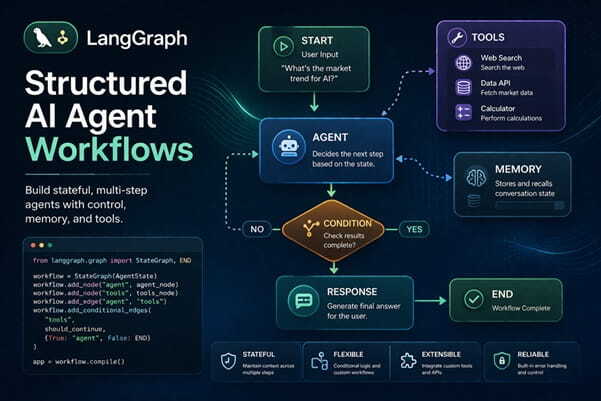
Featured Image Caption: Structured AI agent workflows using LangGraph
Jump to read...
AI systems are shifting from simple prompt based responses to structured, multi step reasoning systems. At the center of this evolution is LangGraph, a framework designed to build stateful and controllable agent workflows. While many developers understand language models, far fewer know how to orchestrate them reliably across complex tasks.
This article dives deep into LangGraph agent workflows, focusing on how they help design predictable, maintainable, and scalable AI applications. Instead of surface level explanations, this guide explores patterns, tradeoffs, and real world implementation strategies that are rarely discussed.
What is LangGraph and Why It Matters
LangGraph is a framework that enables developers to design workflows as graphs, where each node represents a step in reasoning or action, and edges define transitions between those steps.
Unlike traditional pipelines, LangGraph introduces:
- Stateful execution across steps
- Conditional branching logic
- Looping and retries
- Human in the loop checkpoints
This makes it ideal for building agent systems that need memory, control, and adaptability.
Key Idea
Instead of asking a model to do everything in one prompt, LangGraph lets you break tasks into structured steps that interact intelligently.
Core Architecture of LangGraph Workflows
To understand LangGraph deeply, you need to look at its building blocks.
Nodes
Nodes represent individual actions. These could be:
- Calling a language model
- Fetching external data
- Running validation logic
- Triggering tools
Each node has a clear responsibility, which improves reliability.
Edges
Edges define how execution flows between nodes. They can be:
- Linear transitions
- Conditional paths
- Loops for retries or refinement
State
State is what makes LangGraph powerful. It allows data to persist across steps.
Examples of state include:
- User input
- Intermediate reasoning
- Tool outputs
- Memory context
Execution Engine
The engine processes nodes based on graph structure and current state, ensuring deterministic flow.
Why LangGraph is Trending in AI Engineering
The rise of agent based systems has exposed limitations in prompt only approaches. Developers need:
- Better control over reasoning
- Observability into decision paths
- Ability to debug failures
- Modular design for scaling
LangGraph addresses all of these by introducing structured workflows.
Practical Workflow Patterns in LangGraph
Sequential Processing Pattern
This is the simplest form where tasks follow a defined order.
Use case:
- Content generation with validation
- Data extraction followed by formatting
Benefit:
- Predictable output
- Easy debugging
Conditional Routing Pattern
In this pattern, the workflow chooses paths based on logic.
Example:
- If input is technical, route to expert reasoning node
- If input is casual, route to simplified explanation
Benefit:
- Context aware responses
- Improved user experience
Iterative Refinement Loop
This pattern allows repeated improvement.
Flow:
Generate output
- Evaluate quality
- Refine until acceptable
Benefit:
- Higher quality results
- Reduced hallucination
Tool Invocation Pattern
Agents interact with external tools.
Examples:
- Database queries
- API calls
- Code execution
Benefit:
- Real world functionality
- Extended capabilities beyond text
Human in the Loop Pattern
Critical decisions require human validation.
Flow:
- AI generates suggestion
- Human approves or modifies
- Workflow continues
Benefit:
- Trust and safety
- Controlled automation
Designing a LangGraph Agent Workflow
Step One: Define the Objective
Be precise about what the system should achieve.
Example:
- Not just answer questions
- But validate, enrich, and personalize responses
Step Two: Break into Nodes
Each step should have a single responsibility.
Avoid:
Large nodes doing multiple things
Prefer:
Small, focused nodes
Step Three: Define State Schema
Think carefully about what data flows through the system.
Include:
- Inputs
- Intermediate outputs
- Metadata
Step Four: Add Control Logic
Introduce conditions and loops where needed.
This ensures:
- Flexibility
- Error handling
Step Five: Test and Observe
Monitor how the workflow behaves.
Look for:
- Unexpected transitions
- Weak reasoning steps
- Failure points
Advanced Concepts in LangGraph
Memory Management
LangGraph supports both short term and long term memory.
- Short term memory for current workflow
- Long term memory for user history
This enables personalization without losing context.
Deterministic vs Non Deterministic Execution
Some nodes may produce variable outputs.
Best practice:
- Use validation nodes to stabilize results
- Add retry logic for consistency
Debugging Workflows
Debugging is easier because:
- Each node is isolated
- State is visible
- Transitions are explicit
This is a major advantage over monolithic prompts.
Observability
LangGraph workflows can be monitored step by step.
You can track:
- Execution paths
- State changes
- Performance bottlenecks
Real World Use Cases
Intelligent Customer Support
Workflows can:
- Understand queries
- Retrieve knowledge
- Generate responses
- Validate tone
Research Assistants
Agents can:
- Break queries into subtopics
- Gather information
- Synthesize insights
Content Generation Pipelines
LangGraph enables:
- Topic analysis
- Draft generation
- Fact checking
- Tone refinement
Automation Systems
Tasks like:
- Email handling
- Task prioritization
- Data processing
can be structured using graph workflows.
Common Mistakes to Avoid
- Overloading a single node with too many responsibilities
- Ignoring state design
- Skipping validation steps
- Not handling edge cases
- Treating workflows as static instead of evolving systems
Best Practices for Scalable LangGraph Systems
- Keep nodes modular
- Design reusable components
- Use clear naming conventions
- Implement logging at each step
- Continuously refine workflows based on usage
Future of LangGraph and Agent Workflows
The future of AI systems lies in structured orchestration rather than raw model capability. LangGraph represents a shift toward engineering discipline in AI development.
Expect advancements in:
- Multi agent collaboration
- Self improving workflows
- Deeper integration with external systems
FAQs
What makes LangGraph different from traditional AI pipelines?
LangGraph introduces stateful workflows and conditional logic, allowing systems to behave more like structured programs rather than simple prompt chains. This leads to more reliable and controllable outcomes.
How do I start building with LangGraph?
Begin by defining a clear objective, break it into smaller steps, and represent each step as a node. Then connect these nodes with logical transitions and test the workflow iteratively.
Can LangGraph handle complex reasoning tasks?
Yes, it is particularly suited for complex reasoning because it allows step by step execution, validation, and refinement, which improves accuracy and depth.
Is LangGraph suitable for production systems?
It is designed with scalability and observability in mind, making it a strong choice for production environments where control and reliability are essential.
How does LangGraph improve AI reliability?
By structuring workflows into nodes with validation and conditional logic, it reduces randomness and ensures outputs are checked before final delivery.
Can LangGraph be used without deep AI expertise?
It can be learned progressively. While basic understanding of language models helps, the structured nature of workflows makes it accessible to developers with general programming experience.
How do workflows evolve over time?
Workflows improve through monitoring and iteration. By analyzing execution paths and outcomes, developers can refine nodes and logic for better performance.












Leave a Reply